Chapter 3 - Graph & Analysis
Historical graphs and graph analysis
While a graph window is on screen and the graph has been set to log to file, the program enables the graph control buttons on the tool bar.
 Moves the graph to the date and time recording began (Begin).
 Moves the graph back by one X axis span (Fast Rear).
 Moves the graph to a position of your choosing (Goto).
Pressing it brings up the following dialog.
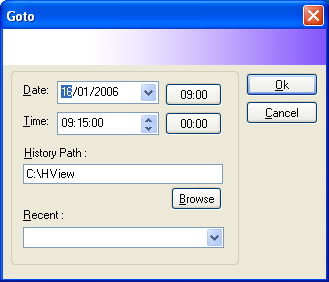
Figure 79 — Goto dialog: setting the date, time and history path for the graph
Enter the date and time you want and press  .
.
 Moves the graph forward by one X axis span (Fast
Forward).
Moves the graph forward by one X axis span (Fast
Forward).
Moves the graph to the present time (Real Time).
To show the graph at the present time, this button must be held down.
The buttons showing a time jump straight to the time written on the button.
Recent lists positions in the graph you have returned to before; select the entry you want and press
History Path sets where the data to be displayed comes from. If you change it, data can be read back from any directory you choose —
C:\xVieworC:\xView\DATAfor last month's data, for example. Press Browse to select a directory.