Web Server Setup
-
ตรวจสอบให้แน่ใจว่า IIS ติดตั้งและทำงานอยู่
a. หากยังไม่ได้ติดตั้ง ให้ติดตั้ง IIS บน Windows XP หรือรุ่นใกล้เคียง ผ่าน Add/Remove Software ดังนี้
รูป — Windows Components Wizard: เลือก Internet Information Services (IIS) (13.5 MB)
รูป — Sub-components ของ IIS: ตรวจสอบว่ามีเครื่องหมายถูกที่ World Wide Web Service (2.3 MB)
รูป — Sub-components ของ World Wide Web Service: World Wide Web Service (1.9 MB) ถูกเลือกไว้
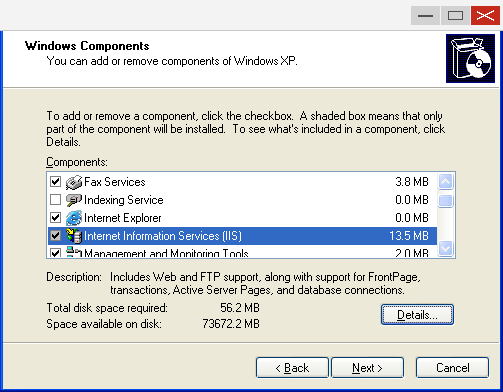
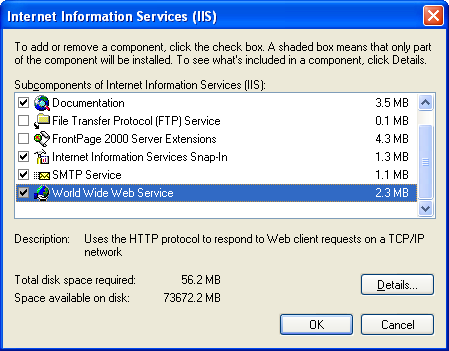
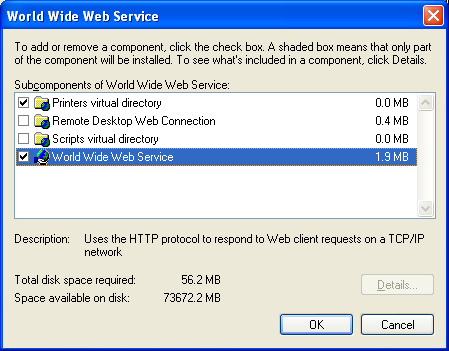
-
ติดตั้ง
msxml.msiซึ่งเป็นส่วนประกอบที่สำคัญมาก สามารถดาวน์โหลดได้จาก http://www.microsoft.com/downloads/details.aspx?FamilyID=3144b72b-b4f2-46da-b4b6-c5d7485f2b42&DisplayLang=en -
คัดลอกไฟล์ Report ทั้งหมดไปยัง
c:\xView\MMIReport -
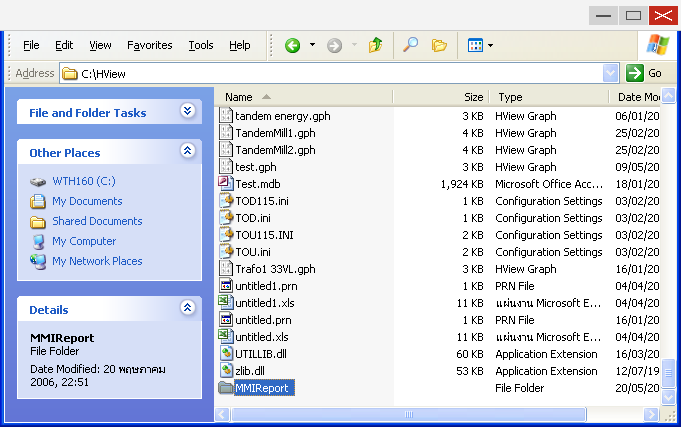
ที่ Folder ของ xView ให้คลิกขวาที่
MMIReportแล้วเลือก Properties
รูป — Folder
C:\xViewใน Explorer คลิกขวาที่ Folder MMIReport
- ไปที่แท็บ Web Sharing
รูป — MMIReport Properties แท็บ Web Sharing: เลือก ● Share this folder
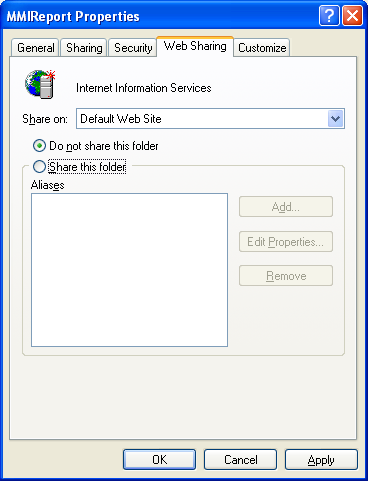
- เลือก Share this folder ระบบจะแสดง Dialog ดังรูปข้างล่าง ให้กด OK
รูป — Dialog Edit Alias; Directory:
C:\xView\MMIReport; Alias: MMIReport; ☑ Read; Application permissions: ● Scripts
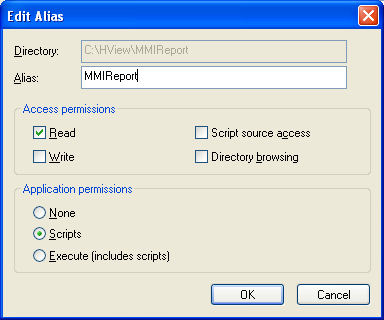
-
กด OK อีกครั้งเพื่อจบขั้นตอน
-
กำหนดให้ทุกคนเข้าถึง Report นี้ได้
a. ไปที่ Control Panel → Administrative Tools → Internet Information Services
b. ไปที่ Servername → Web Sites → Default Web Site → MMIReport (หรือ Report)
c. คลิกขวาที่ MMIReport
d. ไปที่แท็บ Directory Security
รูป — MMIReport_Local Properties แท็บ Directory Security: กด Edit ในส่วน "Anonymous access and authentication control"
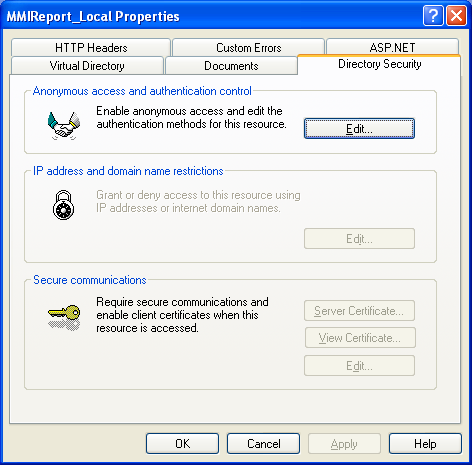
e. กด Edit ในส่วน "Anonymous access and authentication control"
f. ทำเครื่องหมายถูกที่ Anonymous access ส่วนตัวเลือกอื่นให้คงไว้ตามเดิม
รูป — Authentication Methods: ☑ Anonymous access (User: IUSR_WTPC64); ☑ Integrated Windows authentication
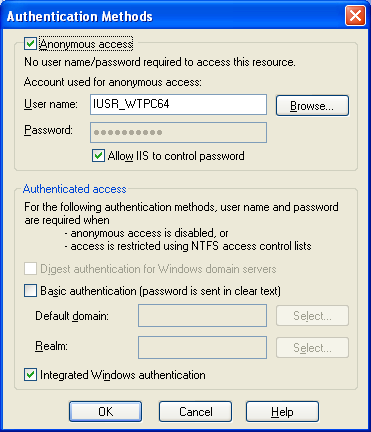
g. กด OK ไปจนจบขั้นตอน
- กำหนด Default Document ให้เป็น
index.htm